A Music and Audiobook Server on a 2019 Raspberry Pi: What It Handles
October 7, 2026
Also on dev.to
The server behind own.audio is open source now: the same Rust and PostgreSQL code the hosted service runs, minus the parts that only make sense for a hosted service (billing, AI narration). It’s on GitHub under the AGPL and on Docker Hub for amd64 and arm64. It is still an alpha. Releases are tagged and tested, but some features are still being built.
A self-hosted server is only interesting if it runs on what people actually have, so we didn’t test it on a fast machine. We used a Raspberry Pi 4 that had been sitting in a drawer: Model B, revision 1.1, the first one made in 2019, with 4 GB of RAM and a 32 GB SD card. No SSD, no USB disk. Everything lives on the card: the system, the database and the music. Then we measured it.
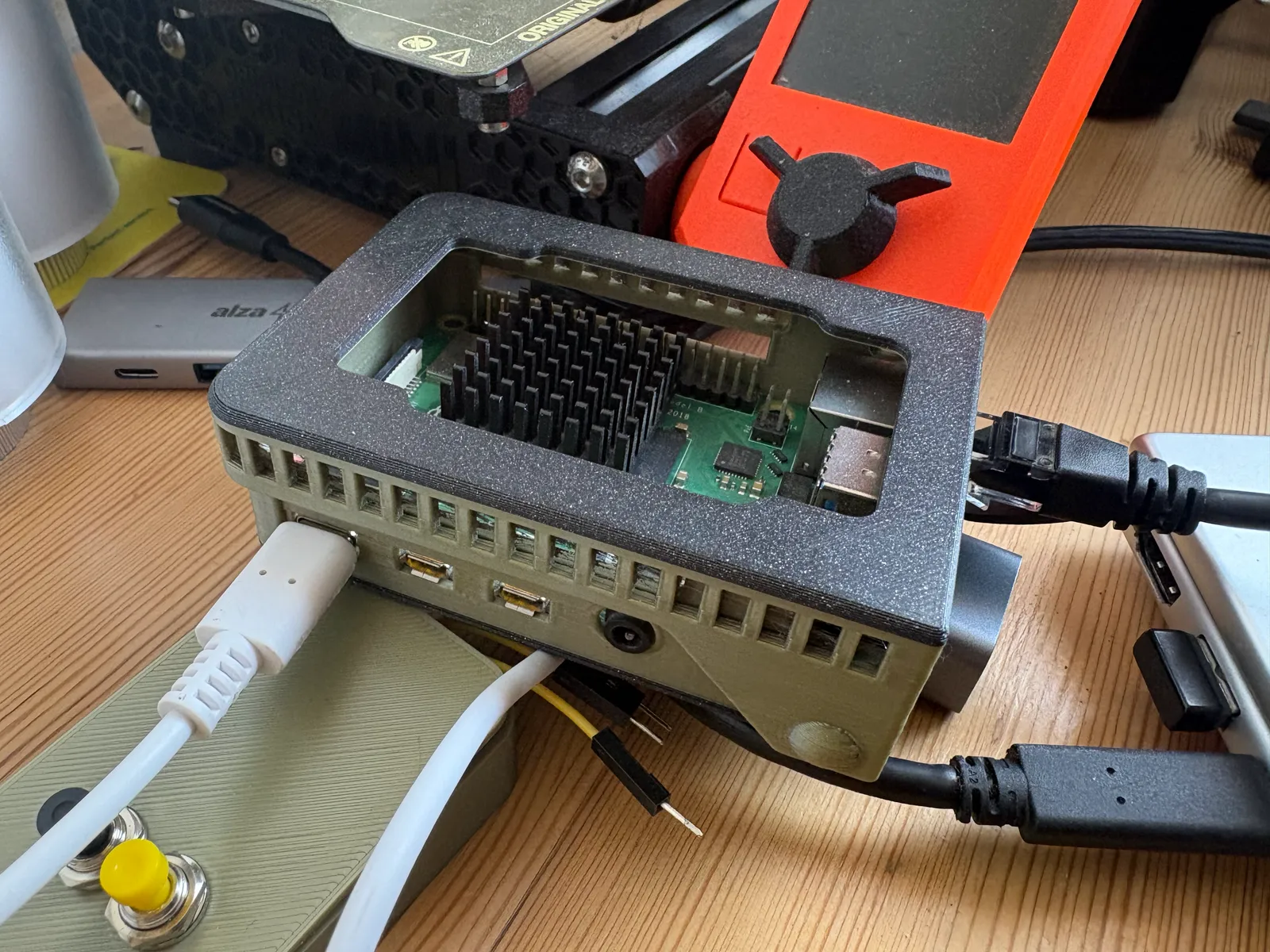
It’s online as a public demo at demopi.own.audio, signed in with the guest account shown on the login page, and it’s reached through a Cloudflare Tunnel from a home connection.
What the server does
One install serves one family, however many people that is:
- Audiobooks: multi-file books, authors, series, bookmarks, and progress that follows you between devices.
- Podcasts: subscriptions, downloads on the server, transcripts where the feed has them.
- Music: albums, artists, genres, playlists and smart playlists, lyrics, ratings. It also speaks the OpenSubsonic API, so existing Subsonic apps work.
- Family: everything is private by default and shared when you choose; roles, per-member parental controls, joining by link or QR code.
- Your folders, read-only: point it at the music and audiobook folders you already have and it indexes them in place. It never writes there. Uploads go to its own disk or to an S3 bucket.
- Nothing phones home: no telemetry, no update checks, no accounts anywhere except on your server.
It comes with a web app. The native apps for iPhone, Android and Mac talk to the same API, and they’re still in development.
The setup
Raspberry Pi OS Lite, 64-bit (the image is arm64 only, so a 32-bit system won’t run it), then Docker and one compose file with three containers: the server, PostgreSQL 16 and cloudflared for the tunnel. The music and audiobooks are two folders on the card, mounted read-only:
server:
  environment:
    LIBRARY__MUSIC: /music
    LIBRARY__AUDIOBOOKS: /audiobooks
  volumes:
    - /srv/media/music:/music:ro
    - /srv/media/audiobooks:/audiobooks:ro
Every 30 minutes a cron job checks for a newer release and rolls back if the new one doesn’t come up healthy. Every night at 4 a.m. the demo resets to a clean state. The full guide is in docs/RASPBERRY_PI.md.
A note on Raspberry Pi OS: it ships with memory accounting for containers turned off, so docker stats shows 0 B for everything. Add cgroup_enable=memory cgroup_memory=1 to /boot/firmware/cmdline.txt and reboot.
Memory
This is the Pi at rest, copied from the terminal:
NAME                    CPU %     MEM USAGE / LIMIT
pi-demo-server-1        3.64%     13.47MiB / 3.707GiB
pi-demo-cloudflared-1   0.40%     20.17MiB / 3.707GiB
pi-demo-postgres-1      0.76%     98.22MiB / 3.707GiB
The server itself takes 13–29 MiB depending on what it has just done, and it peaked at 34 MiB under load. Most of the memory goes to PostgreSQL, which sits around 45–50 MiB after a fresh start and about 100 MiB once it has worked for a while, because it keeps what it read in its cache. The whole machine uses about 430 MiB, including the operating system. A 1 GB Pi 3 should have room for this.
Getting the server this small took one specific fix. By default, glibc’s allocator keeps the memory a burst of work used, so the server would sit at 270 MiB after a busy minute. Three environment variables in the image (MALLOC_ARENA_MAX, MALLOC_MMAP_THRESHOLD_, MALLOC_TRIM_THRESHOLD_) bring that peak down to 28 MiB with no change in speed. RAM_USAGE.md has the details.
Compared with Navidrome and Audiobookshelf, the two servers a household would otherwise run side by side: our server process is smaller than either of them (17 MiB idle against 86 and 78). With PostgreSQL included, our stack came out smaller than the two of them together, 41 MiB idle against 164. That was measured on a Mac with small libraries, not on the Pi, and the like-for-like run with the same large catalog hasn’t been done yet, so take it as a direction, not a precise number. Neither of them can use PostgreSQL. Both embed SQLite, so the database is part of their figure, while ours is a separate container.
Scanning a library
A first scan reads the tags of every file, and later scans only read what changed. On the Pi:
| Library | Files | Time |
|---|---|---|
| FLAC albums (CD rips) | 218 | 5.3 s |
| Audiobooks, MP3 parts | 611 | 3.5 s |
| Generated MP3 test files | 1,448 | 210 s |
That’s roughly 40 files a second for real FLAC and 175 a second for audiobook parts. The generated files were much slower, at about 7 a second. A 10,000-file collection takes somewhere between five minutes and half an hour, once. The server’s memory stayed under 10 MiB while it scanned.
This test also found a real bug. At first the scan got slower with every file, because a check that a file’s path was free compared it against every earlier file. That now uses an index, and the fix shipped in 1.0.0-alpha.7.
How many listeners, at home
We wrote a small load tool, loadtest.py, and ran it from a Mac on the same network. Each simulated listener loops with no pauses: it opens the home screen, lists albums and audiobooks, searches, checks its stats, starts a song or a chapter, reads it in 256 KB chunks the way a player buffers, jumps to a random point, and reports its progress. Real people are far less busy. One simulated listener makes about as many requests in a minute as a person does in an evening.
Here’s 16 of them at once, as printed (the last two lines come from docker stats, sampled alongside; trimmed slightly):
16 listeners, 46 s, 10864 requests (236.8/s), 1094 MB streamed, 17 errors
  albums           n=  882  median     29 ms  p95    107 ms
  audiobooks       n=  882  median     28 ms  p95    105 ms
  home: continue   n=  882  median     39 ms  p95    118 ms
  range read       n= 4376  median     56 ms  p95    147 ms
  report session   n=  865  median     32 ms  p95    110 ms
  save progress    n=  331  median     36 ms  p95    116 ms
  search           n=  882  median     70 ms  p95    143 ms
  stats            n=  882  median    126 ms  p95    247 ms
  stream link      n=  882  median     31 ms  p95    107 ms
  error: HTTPError: HTTP Error 416: Range Not Satisfiable
  pi-demo-postgres-1     memory median   98.8 MiB  peak   99.1 MiB   CPU median 166.3%  peak 190.0%
  pi-demo-server-1       memory median   18.8 MiB  peak   20.2 MiB   CPU median 104.4%  peak 126.6%
(The errors are the tool’s fault: it sometimes asks for a range past the end of a very short file, and the server correctly refuses.)
The full ramp:
| Listeners | Requests/s | Streamed in 45 s | Median range read | Server memory, peak | PostgreSQL CPU, median |
|---|---|---|---|---|---|
| 1 | 33 | 148 MB | 31 ms | 13 MiB | 14 % |
| 2 | 62 | 281 MB | 33 ms | 16 MiB | 29 % |
| 4 | 111 | 508 MB | 37 ms | 19 MiB | 53 % |
| 8 | 183 | 840 MB | 43 ms | 18 MiB | 100 % |
| 16 | 237 | 1,094 MB | 56 ms | 20 MiB | 166 % |
| 32 | 248 | 1,157 MB | 82 ms | 23 MiB | 154 % |
It levels off at about 250 requests a second and 200 Mbit/s of audio. At that point PostgreSQL is using about two of the Pi’s four cores, and that’s the limit. Memory isn’t. Even at 32 listeners, the slowest call (statistics) answered within about half a second.
A single download over the home network ran at 287 Mbit/s. The card reads at 45 MB/s (about 360 Mbit/s), so the “slow” SD card isn’t the bottleneck either:
$ dd if=<a 221 MB audio file> of=/dev/null bs=1M
221305507 bytes (221 MB, 211 MiB) copied, 4.88232 s, 45.3 MB/s
What that means for a household: a lossless stream is about 1 Mbit/s and a good MP3 is 0.2–0.3. Bandwidth alone would allow a couple of hundred lossless streams at once. At home, your Wi-Fi gives out long before the Pi does.
How many listeners, from outside
Then we ran the same test from a small VPS in a data centre, through the Cloudflare Tunnel, which is how the family would listen away from home:
| Listeners | Requests/s | Streamed in 48 s | Median range read | p95 range read |
|---|---|---|---|---|
| 1 | 5.3 | 24 MB | 194 ms | 415 ms |
| 4 | 18.9 | 90 MB | 258 ms | 549 ms |
| 8 | 24.8 | 120 MB | 409 ms | 743 ms |
| 16 | 26.7 | 132 MB | 1,144 ms | 1,436 ms |
| 32 | 26.9 | 132 MB | 2,615 ms | 2,962 ms |
It stops at about 22 Mbit/s, which is this home connection’s upload speed. A single download through the tunnel measured 24 Mbit/s. Meanwhile the Pi sat mostly idle: the server used 12–28 % of a core and PostgreSQL even less. Away from home, the limit is your internet connection’s upload, not the server.
At 22 Mbit/s, that’s about 20 lossless streams, 70 at 320 kbps, or 300 audiobooks at 64 kbps, in theory. In practice, players download in bursts and nobody listens at exactly the same moment. So a family plus some friends listening from outside is comfortable, and a few dozen people at once starts to get slow. With faster upload, the limits scale with it.
How big a library
On this exact Pi, the card is the limit. After the system, Docker images and the database, about 20 GB is left: roughly 2,500 MP3 songs, or 60 long audiobooks. That’s enough for a demo. For a real collection, use a USB disk. PostgreSQL writes to its storage all day, and that wears an SD card out.
With a disk, the size of the catalog is mostly the database’s problem, not the server’s. We tested 600,000 tracks and 1,000 audiobooks (generated database rows, on a Mac, not on the Pi). The server’s memory stayed flat: listing all 600,000 tracks, a 309 MB answer, peaked at 19 MiB, because it’s streamed, not built in memory. Album and artist lists took 0.4–0.7 s at that size, and search 0.14 s. Some Subsonic calls are still slow at that scale (search took 1.2 s), and that’s the next piece of work. CAPACITY.md lists what’s still open. We haven’t run 600,000 tracks on the Pi. A first scan that size would take somewhere between several hours and a day at the rates above, and later scans would be short.
What we’d tell someone trying it
- Use a 64-bit OS and a USB disk. The SD card works, as shown above, but it’s not where your database should live long-term.
- Set
PUBLIC_URLto the address your family uses. One thing we found: links to audio files are built fromPUBLIC_URLtoday, so a phone at home on Wi-Fi also streams through the tunnel and your upload speed, not straight over the local network. If you use a tunnel, keep that in mind until it’s fixed. - A Pi 4 is more than enough. A Pi 3 should be too, judging by the memory figures; we’ll add measurements from one when we’ve done them.
Where own.audio fits
If you like running your own hardware, this is the server, and the Pi demo shows the floor it needs. If you’d rather not run a server at all, the hosted own.audio is the same code that someone else keeps running, with apps for iPhone and Android on the way. Both are still in development, and the roadmap shows where each piece stands.